How Can We Help?
Key Concepts and Terminology
FileMaker Terminology
There are some behaviour and concepts used in this system which may be different to other systems you have used.
Here are some terminology which will be referenced throughout the help pages and application…
- A database table stores like information. ie: The PATIENT table (section) stores Patient names and details while a MEDICATION table would store the details on a Patient’s medications.
- A found set is the group of records currently in focus and maybe different from the total number of records in the table. ie. The results of a search may show 23 matching records from a total of 58 records.
- A portal is a list used to display and navigate related records (often used in a tab on a detail screen)
About Context…
Due to the related structure of the database, most functions are based in the context of where you are now within the system. In other words, if you are looking at a list of Postcodes in the POSTCODES section, then the Find & Report functions will be based on the context of the Postcode table. There is no point trying to find Patient Medications while in the Postcodes section!
Use the TAB key (Not Return)
Use the TAB key on your keyboard to go forward through any editable fields on a layout. You can use the Shift and TAB keys together to go in the reverse order.

Single Clicks!
Like navigating a web page, you only need to click once on a navigation object or button to activate it when using this app. (except for iPad users). Navigation and functional objects may appear as buttons, tabs, popovers and links.

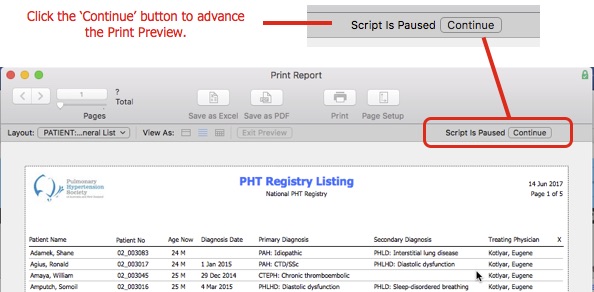
Print Previews – Look for the Continue button!
The ‘Continue’ button needed to advance from the Print Preview screen is hard to spot until you get used to i! It looks like this.
– End –