How Can We Help?
Sharing a Patient Record
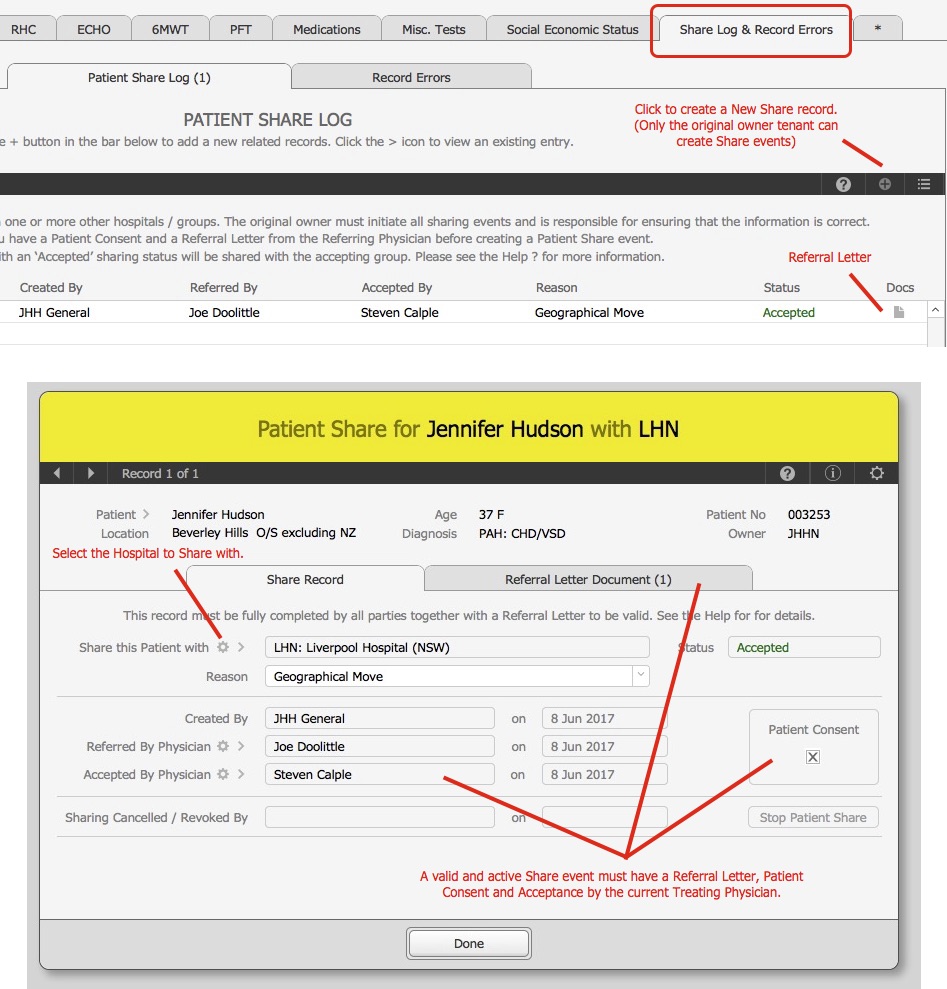
The Patient Sharing function allows a single Patient record to be shared to one or more other groups (hospitals). This is useful when Patients move to different states and are then looked after by different Physicians and now negates the need to create a duplicate Patient record belonging to each tenant (hospital).
How it works:
- The Patients new Treating Physician requests access of the Patients record from the previous Physician
- The original owner tenant of the Patient, creates a new patient share event via the Patient > Patient Share Log tab and completes the appropriate physician linking including the attachment of a Referral Letter.
- Once the Accepting Physician has acknowledged the record, the Patients records can then be accessed by users in both the original and accepting hospitals. The Ownership is denoted by a + sign appended to the original tenant code : e.g.: JHHN+.
The successful functioning of the this process requires:
- Each physician linked in the Share record has a valid email address so they can receive notifications.
- There is a Referral Letter and Patient Consent for the record
- All fields in the Patient Share entry have ben completed properly
NOTES
- Only Authorised and Active records are valid for sharing.
- Only the original owner of the record can create a share event.
- Only Patient Share Event records with an ‘Incomplete’ status can be deleted. (Options button)
- A Share record can be Cancelled or Revoked at any time.
- The system will send emails to the Accepting Physician on Cancellations and Acceptances. The Referring Physician will be Cc’d on these.
- Share acceptance and cancellations are captured in the Patients Audit log.
– End –