How Can We Help?
Snapshot Links
The time-saving Snapshot Link function saves the listed records into a special (fmpsl) file which when clicked on will recall the list exactly as it was saved. This is a very useful way to distribute lists for later followup. You can also use the ‘Saved Lists and Searches’ function for creating saved lists.
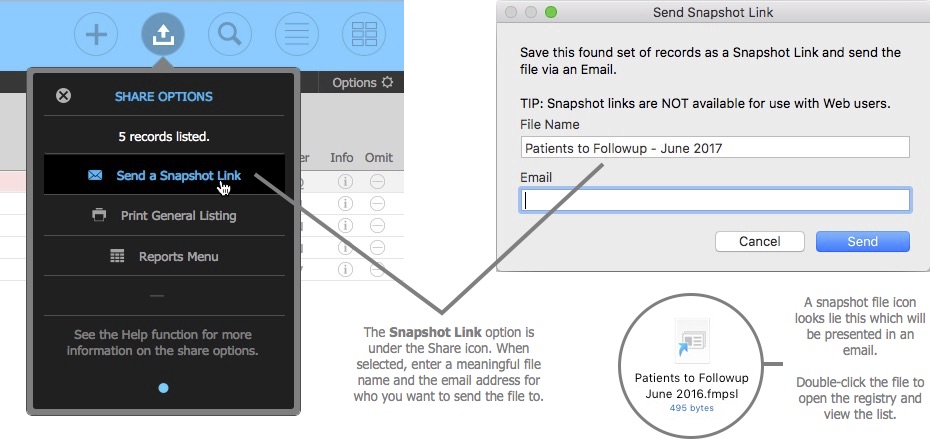
You can access the Snapshot Link function from the Share icon.
How to Create a Snapshot Link
- Isolated the records you want to save.
- Select the Snapshot Link function from the Share icon.
- Enter a meaningful file name and the recipients email address.
- Click the ‘Send’ button. An draft email will now be created in your local email software with the Snapshot Link attachment ready for you to send.
NOTES
- Web mail and some email clients may not be compatible be FileMaker’s Send Email function.
- The snapshot link function is also used in the ‘Saved Lists and Searches’ function.
- Sharing Snapshot Link file between users with different security permissions may yield different results.
– End –