How Can We Help?
Logging in and Setting Up Shortcuts
Login Accounts
A valid Login account is required to access the Registry software.
A person wishing to gain access to the Registry must :
(a) be approved by the Registry Administrator
(b) have completed a Login Request Form
Login Accounts are created by the System Administrator or Spot On Software.
Once a login account has been setup for you, you will be notified by email with your login and server access credentials. Please see the Accessing the CHAANZ Registry for more details on this.
Setting up a Favourite Host
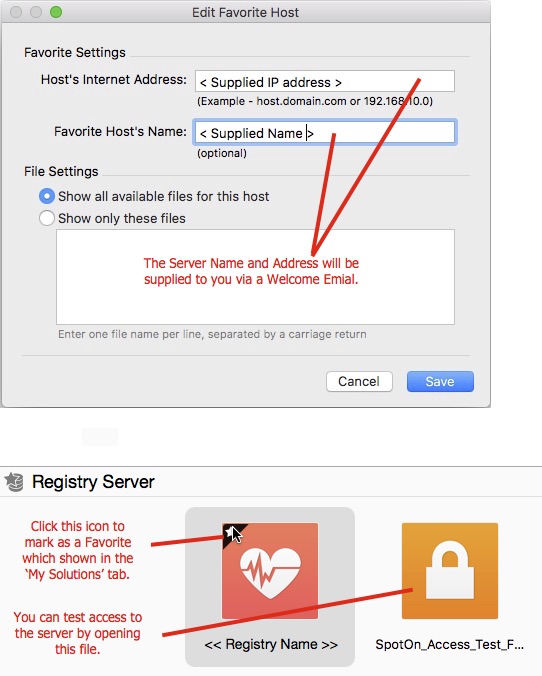
You can setup a favourite host name by using the supplied server details from your welcome email.
- Open the FileMaker application and select the Open Remote option from the File Menu
- Click the + button located in the bottom left panel to create a new host and complete the details.
The first time you access the Registry you will be asked to enter your login details so you can access the server. You will also be prompted to change your default password. Please ensure that you keep passwords private.
Marking the database as a Favourite
Once logged into the server you will then see a list of databases you can access. Click the Registry icon once and mark it as a favourite by clicking the * in the top left corner of the icon. This will make it easier for future logins as you can select the file now form the ‘My Solutions’ tab or by selecting it from the ‘File’ menu.
NOTES
- Login Account names are not case sensitive however passwords are!
- Please notify Spot on Software or the System Administrator if you forget you password so they can reset it for you.
- Do NOT share login accounts and passwords.
– End –