How Can We Help?
Entering Medications
Medications are an extremely important measurement for Registry Patients, so it’s critical that the information entered is both accurate and in the correct format so it can be easily searched and analysed.
Entering a Patient Medication
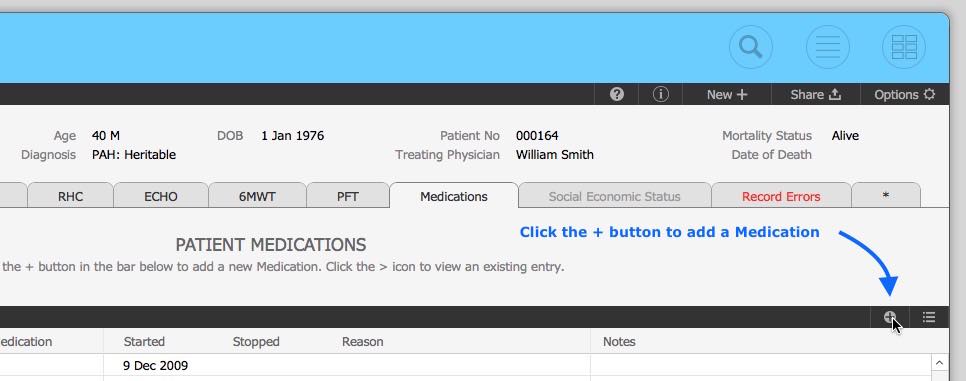
Patient Medications are entered via the Medications tab of the Patient record by clicking the + button located in the header section.
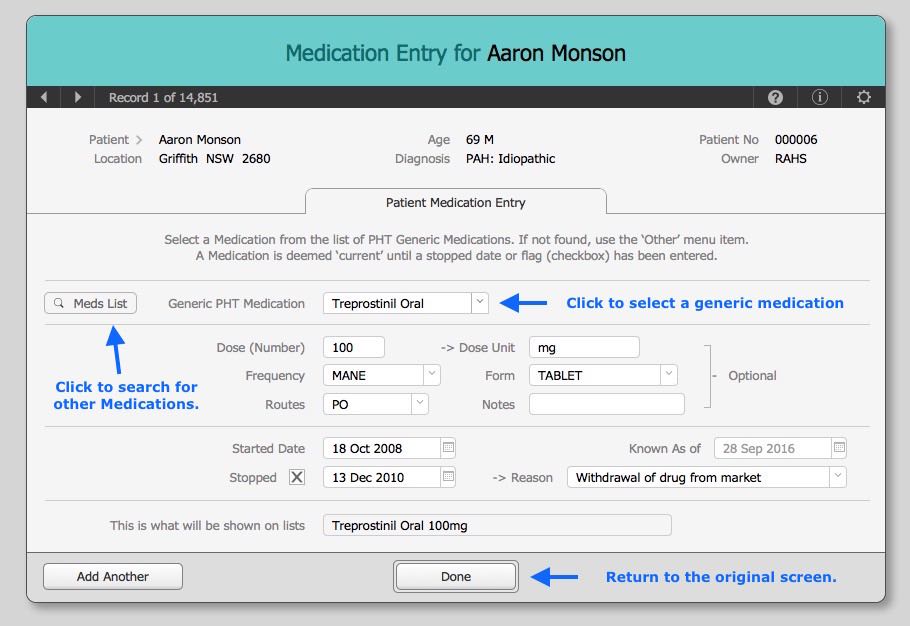
- Always select from the list of generic medications if possible.
- If the item you need to enter is not on the list then use the ‘Other’ item location at the bottom of the list. This will then allow you to access the over-ride field.
- Click the ‘Meds List’ button to check for brands or non PHT generic medications to make sure that the value you want to enter is not a tracked medication.
- If not a tracked medication, then you can also use the dropdown list on the over-ride field to pick from a list of previous entries. i.e.: Riociguat vs Placebo. If it’s still not listed there, then enter it carefully.
- All over-ride values will have a Generic Medication = “Other” and will be omitted from any data analysis.
- All fields except Generic Medication and the Start/Stop values are optional and you should check with your unit co-ordinator for the Registry to see if you need to complete these optional fields.
Generic Tracked Medications
This list shown for the Generic Medications have been pre-defined by the Registry and are regularly reviewed. Entering a Tracked Medication is the Over-ride fields will results in an error with the Medication shown in blue text. If you see this, please remove the over-ride entry and reselect the Medications from the Generic Tracked Medication list.
Other Generic Medications
A searchable list of Tracked Medications and other generic medications are stored in the Medication Reference table. This list can be accessed via the ‘Check Meds List’ button on the entry screen. New medications can be added to this Reference list by the System Administrator.
If you would like to have a new medication added to the reference table please contact the administrator at info@chaanz.com.au.
You can also check for Medication names at eMed Expert or the PBS Website.
-End-