How Can We Help?
Entering Patient Records
New Patient records are created by clicking the + icon on the Patient Detail screen or the Patient Listing.
It is CRITICAL that you do a thorough search of existing records BEFORE entering a new Patient record. DUPLICATE records are a BIG problem!
An accurate Patient record will consist of:
- All known Patient demographic and medical history fields have been entered accurately and in the proper format : i.e.: Proper Case for Names and Addresses (not like BILL sMiTh. See the Data Entry Guidelines to learn more.
- All Tests and sub records have also been entered accurately and any known omissions have the tagged using the not known checkboxes.
- All linked Physicians have got a valid address, mobile phone and email address (needed for notifications)
- Any Errors shown the Patient > Errors tab have been dealt with.
- Followups are being updated regularly to confirm the Patient ‘s Mortality Status (Alive or Deceased)
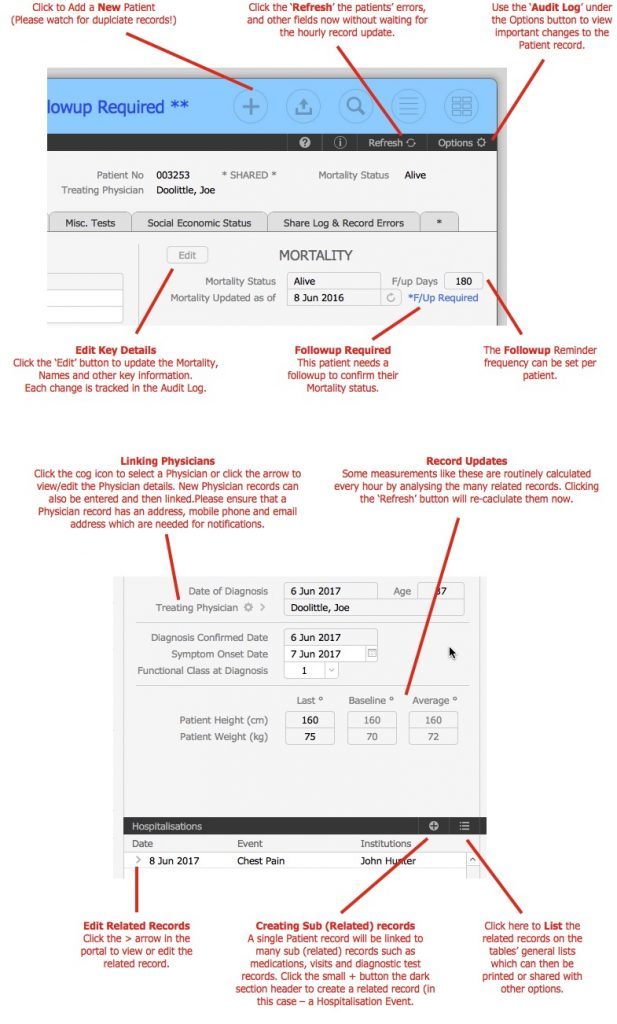
FOLLOWUPS
- The Mortality Status As Of Date confirms when the Patient was last known to be alive. This is automatically updated whenever new diagnostic tests or other patient activities are entered.
- You can also update this date manually by clicking the update icon next to the date for when you have just spoken with them on the phone or seen them physically.
- Followup reminders are used to ensure that Patients are contacted or followed to confirm their Alive status.
- Each Patient can have their own Followup Frequency interval (days) which would normally be 30 – 180 days depending on their circumstances.
- You can use the ‘Followup Reminders’ button on the General List to Patient due for Followup. The ‘Alive’ status is also shown in Blue.
NOTES
- New Patient record are linked to the currently logged in Users Hospital (Tenant)
- A Patient record can be shared with other Hospitals.
- Please check for existing names BEFORE entering new Patients – please avoid DUPLICATES!